Automating Post-Event Follow-up: Why the Real Conversion Starts After the Event
The actual event is not the main show moment — the follow-up is.
You spent weeks planning speakers, coordinating sponsors, managing attendees, and handling logistics. The event goes live successfully. The atmosphere is great. LinkedIn fills up with photos, recaps, and hashtags.
But 48 hours later, the critical phase begins:
- Sales asks for the hottest leads
- Marketing needs recap content
- Leadership wants ROI numbers
- And your team is trying to remember conversations from the networking area
This is exactly where most companies lose the majority of their event ROI.
Industry reports show that most B2B event attendees are never personally contacted after an event — even though this is exactly what participants expect.
The problem is rarely the event itself. The problem is missing or generic follow-up.
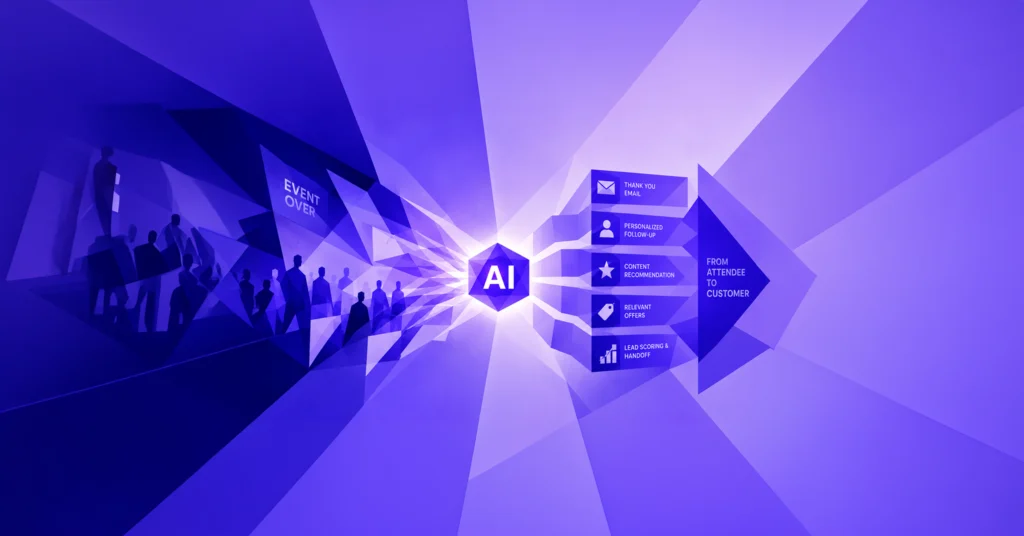
The good news: Modern AI workflows now make it possible to automate personalized, scalable post-event follow-up without spreadsheets or disconnected tools.
In this article, we’ll show you 5 practical AI workflows that help turn event attendees into qualified leads and real sales opportunities.
Why Traditional Event Follow-up Emails No Longer Work
The traditional “Thanks for attending” blast email simply does not work anymore in 2026.
1. Spam Filters Instantly Detect Generic Mass Emails
Major email providers aggressively filter bulk messages. Generic event recaps often land directly in spam or promotion folders.
2. Attendees Instantly Recognize Template Communication
“Thank you for attending our event” does not feel personal. Especially in B2B environments, attendees expect relevant, contextual communication.
3. Hot Leads Are Treated the Same as Passive Visitors
Someone who spent 20 minutes discussing a specific business challenge should never receive the same email as someone who briefly walked by your booth.
The solution: AI-powered follow-up workflows that automatically adapt to conversations, interests, and attendee behavior.
Workflow 1: The Conversation-to-Email Generator for Sales Teams
After an event, the most valuable information often lives inside conversations — and then disappears into voice notes, sticky notes, or business cards.
How the Workflow Works
After each conversation, the sales rep records a short voice memo:
“Spoke with Anna from SAP. Interested in event reporting. Wants a demo next week.”
The AI automatically processes the recording:
- Structuring conversation details
- Extracting pain points and next steps
- Generating a personalized follow-up email
- Syncing data into the CRM
The result: Highly personalized follow-up emails sent within hours after the conversation.
Why It Works
The conversation is still fresh in the attendee’s memory. At the same time, the message feels like a genuine continuation of the discussion — not marketing.
Typical tool stack:
- Voice Memo App
- Whisper API
- Claude or GPT
- HubSpot or Salesforce
Workflow 2: Persona-Based Event Recaps Instead of One-Size-Fits-All
A CTO cares about different topics than HR or marketing. Yet many companies still send identical recap emails to every attendee.
How the Workflow Works
Attendees are automatically segmented based on role or interests:
- CTO
- Marketing Lead
- HR Director
- Operations
- Sales
The AI then analyzes:
- Speaker slides
- Session recordings
- Q&A transcripts
- Networking data
Based on this information, the system generates tailored recap content for each persona.
Examples
- CTOs receive technical insights and product discussions
- Marketing teams receive branding and community topics
- HR leaders receive recruiting and talent-related content
This significantly increases engagement and email open rates.
Workflow 3: AI-Powered Hot Lead Scoring After the Event
After a larger event, hundreds of contacts often end up inside the CRM. The real challenge is identifying who is actually ready to buy.
How the Workflow Works
The AI combines multiple signal sources:
- Sessions attended
- Booth engagement duration
- Asset downloads
- Networking activity
- Firmographic data
- LinkedIn interactions
Based on these signals, the system automatically prioritizes the most relevant leads.
Example
“CFO at MidCorp attended multiple compliance sessions, downloaded the whitepaper, and followed the speaker on LinkedIn.”
This gives sales teams not just a lead list — but clear action recommendations.
Workflow 4: Turn One Event into 30 Pieces of Content Automatically
Events generate huge amounts of valuable content — most of which is never reused.
With AI, one event becomes:
- Multiple SEO-optimized blog posts
- LinkedIn posts featuring speaker quotes
- Social media clips
- Reels and Shorts
- Newsletter content
- Sales outreach snippets
The AI automatically analyzes:
- Session recordings
- Speaker quotes
- Slides
- Chats and Q&As
This extends the lifespan of your event from a single day into weeks of ongoing content reach.
Workflow 5: Adaptive Re-Engagement Sequences Instead of Static Email Flows
Not every attendee reacts the same way to follow-up communication.
Modern AI sequences dynamically adapt based on attendee behavior.
Examples
- Email opened but not clicked → generate a new subject line
- No email open → switch to LinkedIn outreach
- Clicked but no conversion → trigger personalized sales outreach
The AI continuously learns from audience behavior and optimizes future campaigns automatically.
How eventpage.ai Supports These AI Workflows
For AI workflows to function properly, attendee data, session engagement, networking activity, and CRM connections need to live in one centralized system.
That is exactly why eventpage.ai was built.
The platform connects:
- Ticketing
- Check-ins
- Session engagement
- Networking
- CRM workflows
- AI-powered automations
This enables seamless workflows without CSV exports or fragmented tool stacks.
The workflows described above can either be built directly inside eventpage.ai or connected to your existing systems through APIs and webhooks.
Conclusion: Events Do Not End After the Final Speaker
The biggest conversion opportunity often starts after the event itself.
Companies that automate post-event follow-up can:
- Qualify more leads
- Shorten sales cycles
- Increase measurable event ROI
- Personalize attendee communication
- Extend the value of event content
AI does not replace personal relationships — it enables them at scale.
If you want to see how AI-powered event workflows work in practice, book a live demo with eventpage.ai.